For organizers
You take care of the night. The list takes care of itself.
If you organize private events, you’re probably juggling spreadsheets, email threads, screenshots and group chats. Shadeslist replaces that patchwork with one tool.
01Before / after
What changes when your list no longer lives in a spreadsheet.
| Topic | Until now | With Shadeslist |
|---|---|---|
| Registration | RegistrationCollecting emails and messages, copying them into a spreadsheet by hand. | Guests sign up themselves via your link, and you see them on your list right away. |
| Selection | SelectionConfirmations by email, forgotten cancellations, duplicates slipping through. | Pending → Approved with one tap. With an invite code, even automatically. |
| Address | AddressThe location is in the invitation and ends up in other people’s group chats. | Only approved guests see the location, on their personal status page. |
| Door | DoorA printed list, a flashlight, spelling out names. | Scan the QR code or search for a nickname – even offline. |
| Privacy | PrivacyReal names and addresses sit in inboxes and on laptops. | Only nicknames required, contact fields encrypted, deleted after 30 days. |
| Overview | OverviewThe list is scattered across spreadsheets, inboxes and chats. | One list in one place – independent, no integration with third-party platforms. |
02Registration modes
Two ways onto the list. You choose per event.
- Open registration with approval
- Anyone with the link can register and lands on “Pending”. You decide who gets approved. Ideal if you want to meet new people but stay in control.
- Invite code
- Only people with a valid code can register – and they’re approved automatically as long as there are spots left. Several codes per event, each with its own usage limit.
03On the day
Ready before the first person rings the bell.
Open the door view once while you’re still at home with a connection. From then on, the list is on your device – and the night doesn’t depend on reception at the venue.
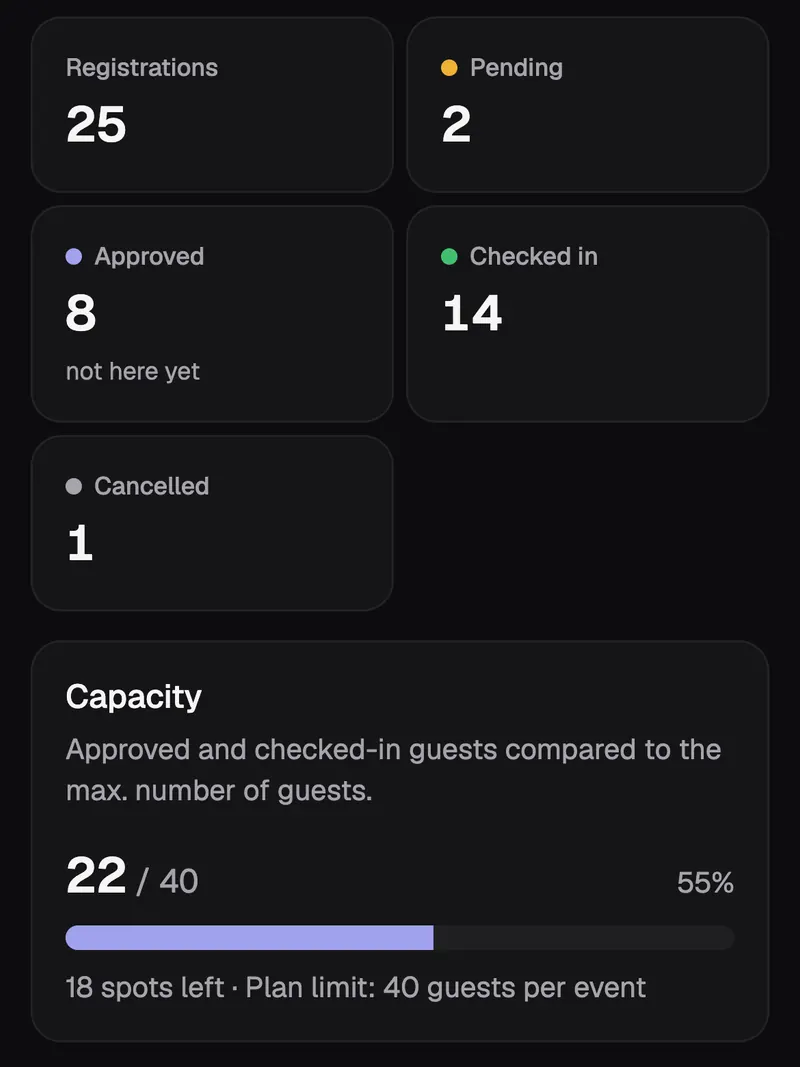
The statistics of an event in the app, with demo data.
- Everything at a glance
- How many registered, approved, already there: the numbers sit right at the top of the list.
- Last-minute cancellations
- Guests can cancel themselves. The spot frees up, and you see it right away.
- After the event
- Export the list if you need it. After that, Shadeslist deletes the guest data automatically after 30 days.
Shadeslist works anywhere in Germany – for example in Berlin, Hamburg, Cologne or the Ruhr area.
04Questions
Questions from organizers
How do I invite guests without collecting their addresses?
You share a link or an invite code through whatever channel you already use: a messenger, email or a private message. Shadeslist doesn’t need address books and doesn’t store recipient lists.
Can I decide who gets in?
Yes. With open registration, every sign-up lands on “Pending” first, and you approve whoever you’d like to have there. With an invite code, guests are approved automatically – so you decide when you hand out the codes.
What happens when the event is full?
With an invite code, guests are only approved while spots are available. After that, further registrations land on the list as “Pending”, and you can move people up if someone cancels.
Can guests see who else is coming?
No. Guests only ever see their own registration. There’s no attendee list, no attendee count and no profiles to click through.
What if there’s no reception at the door?
The door view works offline. Load the list once with a connection before the event; after that, the phone checks QR codes locally and syncs the check-ins automatically later.
Invitation
Your next event. No spreadsheet.
Set up your first event in two minutes. The first 3 months are free – with up to 3 events and 150 guests each, no credit card needed.